5 Ways Sunfire POS Helps CBD Stores Run More Efficiently
A Time-Saving POS System and All-In-One Business Management Platform
by Robert Garrison and Christopher DiBiase
January 28, 2026
Key Takeaways
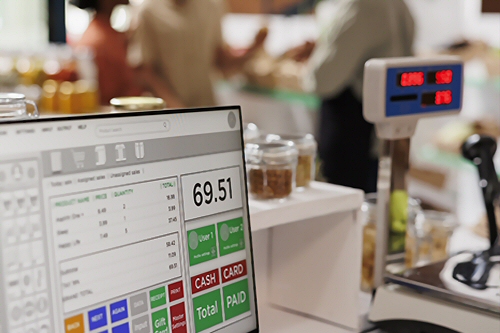 Managing a CBD store can be hectic. From managing inventory, sales, customers, employees, and more, you need a POS that is able to do it all, and do it all efficiently.
Here are 5 ways in which the cloud-based Sunfire POS point of sale system and all-in-one business management platform can help you efficiently operate your CBD shop. Along the way, we'll also share some insights into the process you might not know about.
1. Integrated ID Verification
We partner with AgeChecker.net to give our merchants the ability to compare a customer’s ID card against a national database. By simply scanning or manually entering in a customer’s driver’s license information, you can ensure that you stay compliant with state and federal regulations when selling regulated or controlled substances. You actively protect your business license, avoid penalties and fines, and maintain regulatory compliance with each age-verified transaction.
Depending on the plan you make with Sunfire POS, when your store begins its boarding process, you may have to pay a small monthly fee when checking a customer’s information. This allows seamless communication between Agechecker.net and Sunfire POS. Luckily, Sunfire POS and AgeChecker have you covered by holding onto the customer’s date of birth for 60 days after scanning, allowing you to verify the customer without needing to pay anything extra.
2. Intelligent Inventory Management
Sunfire POS maintains a robust inventory management system that caters to your needs. By entering the Inventory Management module, you can view, edit, and remove items in your stock to ensure that everything is accounted for—all data is logged with a date and time stamp. No more second guessing.
All items can be sorted into categories and subcategories. And by viewing an item in the Inventory Management screen, you can also adjust its price, quantity, and other enable tags such as Tax Exempt, Food & Beverage Tax, ID Verification Required, and more. Do you have items that sell more than the rest? Select it as a Favorite to have it appear at the top of the POS!
Insider Tip: Sometimes, merchants sell items in both packs and individual items. Keep in mind that when you receive packs of items and enter them into your inventory, opening them and selling them individually will cause your quantity to become mismatched. If you choose to open a pack, make sure you adjust your Quantity in Stock accordingly.
Through Sunfire POS, you also have the ability to export various data directly into an Excel spreadsheet. Choose between Products Sold Report, End of Year Inventory, and more through the Inventory Management module. Should you need something more, you can reach out to our team to discuss how we can help you get the information you need.
3. Best-In-Class Customer / Loyalty Management
Keeping track of your customers is very important in competitive industries like yours, and Sunfire POS makes it easy. You can add a new customer to your system in the POS by pressing the “Customer Search” button and then pressing “Add Customer,” but you can also do so in the Customer Management module powered by Factor4. Here, you can Import and Export customer lists, manually add customers to the database, and view every account in your store.
Insider Tip: When adding a customer, we suggest that you at least have their first and last name as well as their phone number, as these are the easiest ways of searching them during a transaction. You can also store their birthday in the event that you wish to offer birthday promotions, and can assign them a Customer Type for if you want to run special promotions or discounts (Like a Veteran or Employee discount).
Should you choose to have it enabled, the Loyalty Program module can help you keep customers coming back in the door and incentivize them to keep shopping with you. By default, we have a system of $1 = 1 Point, and each store can customize how they want to have customers redeem them. More ways for your customers to win = increased customer retention.
In the Loyalty Program module, you can also set up highly customized discounts ahead of time such as: what products are applicable, what percent or dollar amount will be subtracted, what time range they will be available, and restrictions such as “One per customer.”
4. Intuitive Employee Management and Scheduling
With the Employees module, keeping track of your staff has never been easier. When entering a new employee, you can customize what modules and permissions they have access to. We allow for notes and attachments to be coupled with each employee, so you can keep all of their documents and scheduling notes in one location. Promoting and demoting employees can be done with just a few clicks, and the same goes for deactivating and deleting employees.
Insider Tip: Our Employee Scheduling module is just as intuitive. You are given a calendar and you can add each employee’s shift start and end times with notes for them to read. Employees can keep track of their shifts through Sunfire as well!
5. Speedy Support Tickets
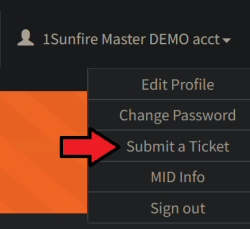 However you slice it, Sunfire POS is big. And while we maintain an in-depth Knowledgebase module that covers the functions and operations of Sunfire POS, there will be times when you have questions. In the drop-down menu next to your profile name, you can submit a Support Ticket to our staff. Make sure to include your name, the phone number where we can reach you, the urgency of the ticket, and some details about how we can help. If applicable, you can also submit images and other files that will help us better understand your problem.
According to Sunfire POS Business Development Specialist Robert Garrison, "Our support staff is based entirely within the United States and typically contacts you within 1-5 minutes from 8am-8pm, 7 days a week. Our standard is to ensure you will receive the best help possible as soon as possible."
Bulletproof Compliance is Just One Click Away
Don’t leave your license to chance. Our specialized CBD store software features real-time AgeChecker.net integration, automated reporting, and secure employee management. See why CBD American Shaman and others choose Sunfire to stay compliant and efficient.
Request a Free DemoSummary
An all-in-one cloud-based point of sale system and business management platform can remove obstacles that threaten your CBD store's success. Sunfire POS has just shared 5 ways it can increase efficiency with your shop:
- Age and ID verification
- Slick inventory management
- Advanced customer / loyalty management
- Intuitive employee management
- Industry-best customer support
These 5 POS system enhancements aren't limited to just CBD stores. If you own a smoke / vape shop, or are a CBD retailer, then Sunfire POS is optimized for your business too.